 BitPull
bitpull.cloud · the developer network for AI: shared code, computers and open models
Your AI credits ran out. Your community didn't.
BitPull connects developers. Use open AI models and other people's idle computers when you need more power, lend yours when you don't, and share well-described code with AI tools. Paid plans from €4.50 a month, or pay only for what you use.
How it works
Install the app
On macOS, Windows or Linux. Lending stays off until you turn it on.
Connect your AI tool
Claude Code, Codex, Cursor and others reach BitPull through MCP.
Jobs run on the network
On your own computers first, then on the community's, in isolated sandboxes.
Save, or earn by lending
Pay only for what you use, and earn credits when others use your computer.
What you get
Shared knowledge
Your AI finds code already written and described by others and reads only the files it needs. That can save tokens; how much depends on the project.
Shared computing
Builds, tests, data processing and open AI models run on community computers, in sandboxes deleted when the job ends. Your data stays encrypted until it reaches the computer that runs the job.
Safe for lenders
No access to your files. You decide when, how much and what to lend. Keys and passwords are never shared.
Is it safe?
- Our server cannot read your jobs: they stay encrypted until they reach the computer that runs them.
- Jobs run without internet and without access to the lender's files.
- You decide when, how much and what to lend.
See the app
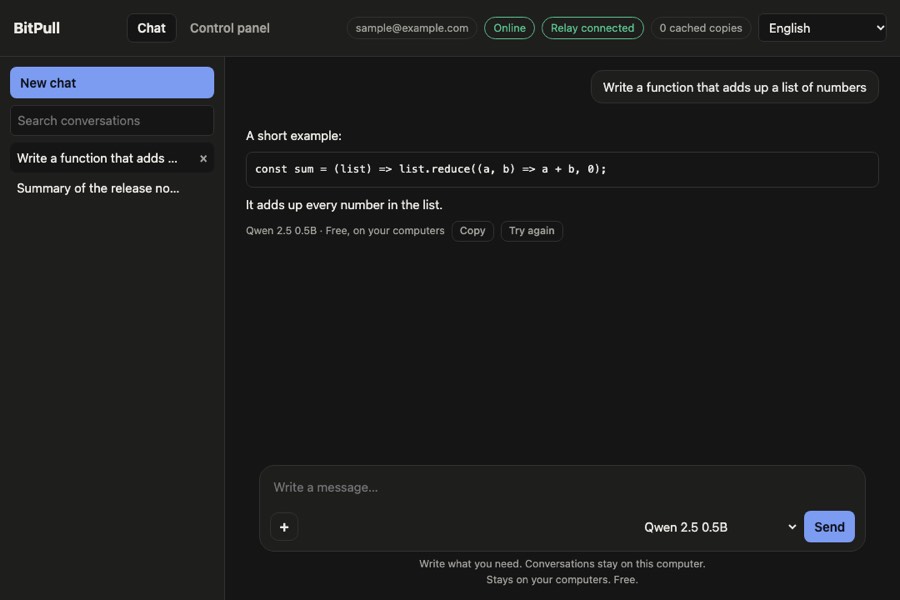
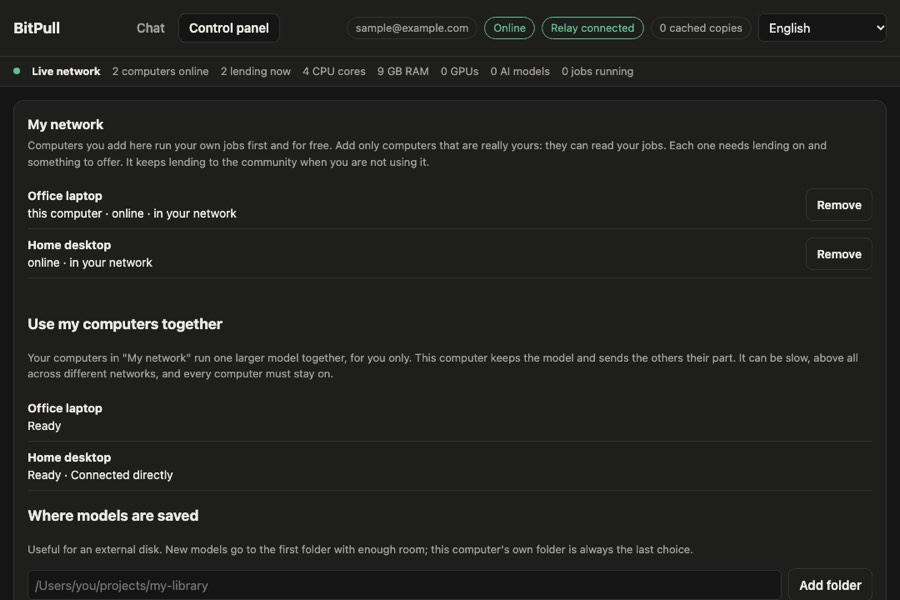
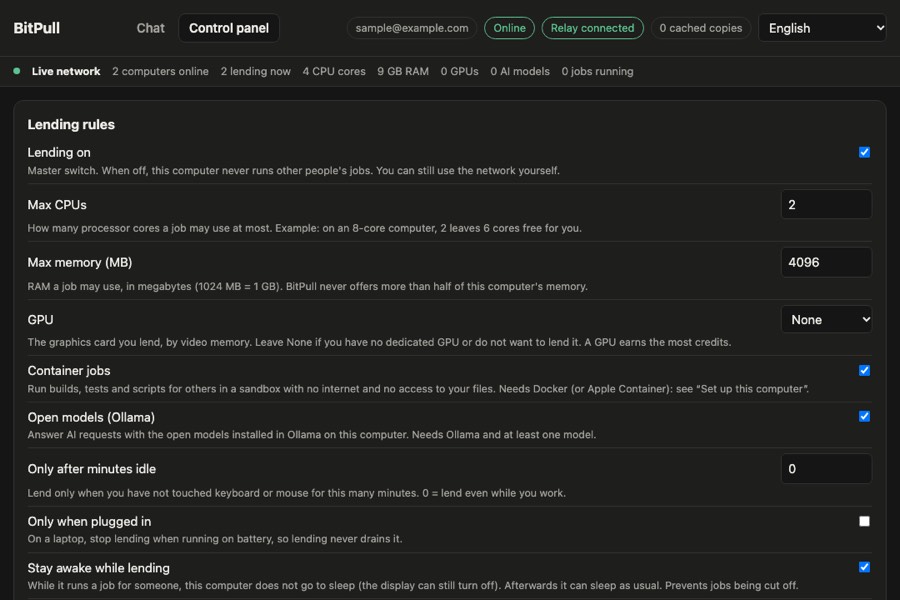
Examples with sample data.
Costs less, because the computers already exist
Models run on the community's idle computers, not in a data centre paid for by your subscription. Paid plans start at €4.50 a month against about €20 for a typical AI subscription, there is a plan with no monthly fee, and lending is always free. Your own computers cost nothing, and you earn credits when others use them.
BitPull and AI subscriptions
| Service | Price per month | What you get |
|---|---|---|
| Pay as you go | €0 + what you use | Open models on community computers, paid per use. Your own computers are free. |
| BitPull Base, Pro, Max | €4.50 to €19.90 | Monthly credits for open models, and groups of your computers. |
| ChatGPT Plus | about €23 | OpenAI's models |
| Claude Pro, Google AI Pro | about €18–23 | Anthropic's or Google's models |
Prices seen in November 2026: check each provider. Open models are not the same as these companies' top models, and community computers can be slower than a data centre.
BitPull and AI coding tools
BitPull does not replace these tools: it works with them through MCP. They keep their own subscription, and BitPull adds open models and computers for routine work.
| Tool | Monthly plans, in dollars |
|---|---|
| Claude Code | Claude Pro $20 · Max $100 / $200 |
| Codex | ChatGPT Plus $20 · Pro $100 / $200 |
| Cursor | Pro $20 · Pro+ $60 · Ultra $200 |
| GitHub Copilot | Pro $10 · Pro+ $39 |
| Windsurf | Pro ~$20 |
Prices before tax, as reported by secondary sources in November 2026: check each provider. Each plan has its own usage limits, which change often. Open models are not these companies' top models.
Paid plans, from €4.50 a month
Base
- 100 credits every month for open models
- Groups of 4 computers, models up to 32 GB
- 10 GB of group traffic through our server
Pro
- 250 credits every month for open models
- Groups of 9 computers, any model, high priority
- 30 GB of group traffic through our server
Max
- 600 credits every month for open models
- Groups of 9 computers, any model, first in the queue
- 60 GB of group traffic through our server
No monthly fee
Pay as you go
- No monthly fee: buy credits only when you need them
- Groups of 2 computers, models up to 8 GB
- Local network free; 3 credits per GB through our server
Prices include VAT. Recharge any amount from €5, at 16 credits per euro. Plan credits work on open models; paid models use the credits you buy. Credits are for your use on BitPull and cannot be converted into money.
What do credits buy?
€5 buys 80 credits: about 80 million tokens on a small open model, 20 million on a medium one, 6.6 million on a large one, or 80 hours of one processor core.
What is a group?
Your own computers running one larger model together. The plan sets how many computers can join.
What do the GB mean?
The size of the model's file, not your graphics card's memory. Together your computers need a little more memory than that.
Can several people share an account?
An account belongs to one person, who can connect several computers.
For lenders: earn credits with your idle computer
Lending is off until you turn it on. You choose when and how much, you earn 80% of what each job costs, and jobs have no access to your files.
Estimate your credits
An estimate at today's rates. You earn only when someone really uses your computer, so it can be much lower, even zero. Credits are not money.
In plain words
- MCP
- The standard way AI tools such as Claude Code connect to other services.
- Sandbox
- An isolated space where a job runs, with no internet and no access to the computer's files.
- GPU
- The graphics card: it runs AI models much faster than the processor.
- Open model
- An AI model whose files are public, so anyone can run it.
- Credit
- What you spend and earn on BitPull. €1 buys 16.
About us
BitPull was born from a simple problem: AI tools run out of credits right when you are working, while many computers sit switched on doing nothing. The power developers need already exists. What was missing was a safe way to share it.
BitPull is built by Zefirox S.R.L., an Italian software company based in Milan, founded in 2022. We want AI that costs less, that leaves you in control of your computers and your data, and that says plainly what it does and what it does not do. That is why we also publish our limits.
Frequently asked questions
What is BitPull?
BitPull is a free desktop app for developers (macOS, Windows, Linux). It shares code knowledge with AI tools such as Claude Code, Codex and Cursor through MCP, and shares computing power: CPU, memory and open AI models. Using other people's resources costs credits; lending yours earns them.
How does it help when my AI credits run out?
Your AI finds code that others have already written, signed and described, and reads only the files it needs, which can save tokens. Simple tasks such as summaries, tests or routine changes can go to open AI models running on community computers.
What do I need to install?
Only the BitPull app to use the network. To lend CPU and memory you also need Docker or Apple Container; to lend AI models, Ollama or the image, speech and music engine that BitPull installs by itself. The app shows what is required and what is optional on your computer.
How do credits work?
You spend credits when you use other people's resources and earn 80% of what others spend on yours. With pay as you go there is no monthly fee and you recharge any amount from €5. Base (€4.50 a month), Pro (€9.90) and Max (€19.90) include monthly credits for open models, larger groups and priority.
Can my AI assistant install and set it up?
Yes. AI assistants find everything at bitpull.cloud/llms.txt and bitpull.cloud/install.json, with verified installers and the list of required and optional components. BitPull is in the official MCP registry: "npx -y bitpull mcp" connects it to Claude Code, Codex, Cursor and others, and you approve the login on the website.
Is bitpull.cloud the same as other products called BitPull?
No. This BitPull is the developer network at bitpull.cloud and is not affiliated with other products or companies with a similar name. The official app is downloaded only from bitpull.cloud (or github.com/SamuealPK/bitpull-releases), the npm package is “bitpull” and the MCP server is io.github.SamuealPK/bitpull.
Why does BitPull cost less than other AI services?
Open models run on computers people already own, so nobody pays for a data centre. Paid plans start at €4.50 a month, there is a pay-as-you-go plan with no monthly fee, questions to your own computers are free, and lending earns you credits. Paid models such as Claude or GPT cost their official price plus a margin: there the advantage is one balance for every model.
Your account
Buy
Install the app
The app runs on your computer: it shares the folders you authorise and lends resources by your rules.
Your published repos
| Name | Description | License |
|---|
Credit history
| Date | Reason | Credits |
|---|
Download BitPull
The app connects this computer to the network, opens your dashboard and plugs into Claude Code, Cursor and other AI tools.
The app is not distributed through app stores. On macOS, the first time: open the app, then go to System Settings → Privacy & Security and click Open Anyway next to BitPull. On Windows, choose More info → Run anyway.
To lend computing power you also need Docker (or Apple Container on macOS); to lend AI models, Ollama.
Prefer the terminal? The same agent runs as a command-line tool.
Install from the terminal or with your AI
The script downloads the latest version, checks its SHA-256 and installs it for your user. macOS and Linux first, Windows (PowerShell) second.
curl -fsSL https://bitpull.cloud/install.sh | sh
powershell -ExecutionPolicy Bypass -c "irm https://bitpull.cloud/install.ps1 | iex"
AI assistants (Claude Code, Codex, Cursor…) find everything they need to install and set up BitPull here: llms.txt · install.json
Troubleshooting
Common problems with BitPull and how to solve them, from the exact message you see to the fix. Kept up to date with every version.
To check a specific computer run bitpull doctor · help.json · llms.txt
Connect a computer
Your BitPull app, command line or AI assistant asked to log in to your account. Enter the code it shows.
Approve only if you started this yourself on your computer just now. Never approve a code someone sent you.
Report content
Report illegal content, malware, copyright infringement or abuse. We review every report and reply if you leave an email.
How BitPull protects you
What is protected, what is not, and what you can do about it, limits included.
Who sees what
| Who | Can see | Cannot see |
|---|---|---|
| BitPull server | Size, model, time and cost of a job | What is inside the job |
| Computer running the job | What is inside that job, while it works | Your account, your other jobs, your files |
| Paid models (Claude, GPT…) | Your request, which passes through our server to the provider | Your jobs on the network |
What is encrypted
- Job content is encrypted on your computer with a key made for that job. Our server keeps only the encrypted copy, and the key is sealed so that only the computer running the job can open it.
- Results come back encrypted the same way, and the encrypted data is deleted 24 hours after the job ends.
- While it works, the computer running the job has to read the content. Encryption cannot change that.
- Requests to paid models pass through our server to the provider and are not protected this way.
If a computer misbehaves
- It can read the job it receives and can return a wrong answer.
- It cannot reach your account, your computer or other people's jobs.
- It never receives jobs kept for your own computers: our server decides this, not the app.
- Computers that fail or give wrong results lose reputation, and below a limit they stop receiving jobs.
- Some jobs with a fixed result are run twice and compared. AI answers cannot be checked this way.
How lenders are protected
- Jobs run in a sandbox with no internet, no access to the computer's files and no system privileges, with limits on processor and memory. It is deleted when the job ends.
- Lending is off until you turn it on, and you choose when, how much and what to lend.
- Open AI models run in their own program, not in a sandbox: they receive text and files to read, not commands to run.
Groups of your computers
- Your computers talk over an encrypted connection with a key only they have, directly on a local network or through a relay that cannot read it.
- If you offer a group to others, their requests are read on your computer by a program outside a sandbox, so a defect in that program could affect you. It stays off until you turn it on.
The limits
- No sandbox is perfect: it lowers the risk, it does not remove it.
- Our server hands out the keys that protect jobs, so you are trusting us to run it honestly.
- Anyone with your login can act as you: use a strong password.
- BitPull has not had an independent security audit yet.
This is a translation provided for convenience. The English version is the binding one.